Find Out How

Enabling Cross-Domain Browser Tests
|
In some cases while recording a Browser Action clip, the recording includes URLs from more than one domain, or hits URLs that require permission that is present during the recording session, but not when test clip playback occurs. SOASTA CloudTest has successfully recorded the browser actions but when the test clip is played a "Transport Error" is produced: Error reported from Conductor: Name's conductor running Firefox: Coordinator fault: 'Conductor exception: Permission denied to get property Location.href (com.soasta.com.exceptions.Conductor.Exception)' (Conductor fault, operation: "performRemoteAction".)
|
 |
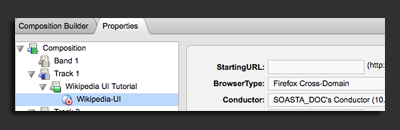
The Composition Properties are displayed below. |
|
Note: Select IE Cross-Domain if this test is conducted in Internet Explorer. |
|
One or two of these options should solve this problem. |
|